Don't Deep Freeze: Designing the Outcome, Not Just the Code
This project was created just after the release of the Sol 5.6 model, at a moment when my understanding of development started to shift. In earlier projects, I spent more time explaining the code itself. Here, the more interesting subject is what happens when producing code is no longer the main limitation.
Code still matters. You need the fundamentals to understand what software is doing, where it can fail, and whether a generated solution makes sense. But the center of the work moves somewhere else. You need to define the result clearly, understand the application and the hardware you are holding, and build good processes for testing and evaluating the complete product.
For me, that means being able to answer three questions:
- What should the product achieve for the person using it?
- How will I know that the software is behaving correctly?
- How will I prove that the physical device remains useful outside my workbench?
This freezer display became a good test of that idea because it combines a real household habit, an AI-assisted software system, and a physical device that has to work reliably in the kitchen.
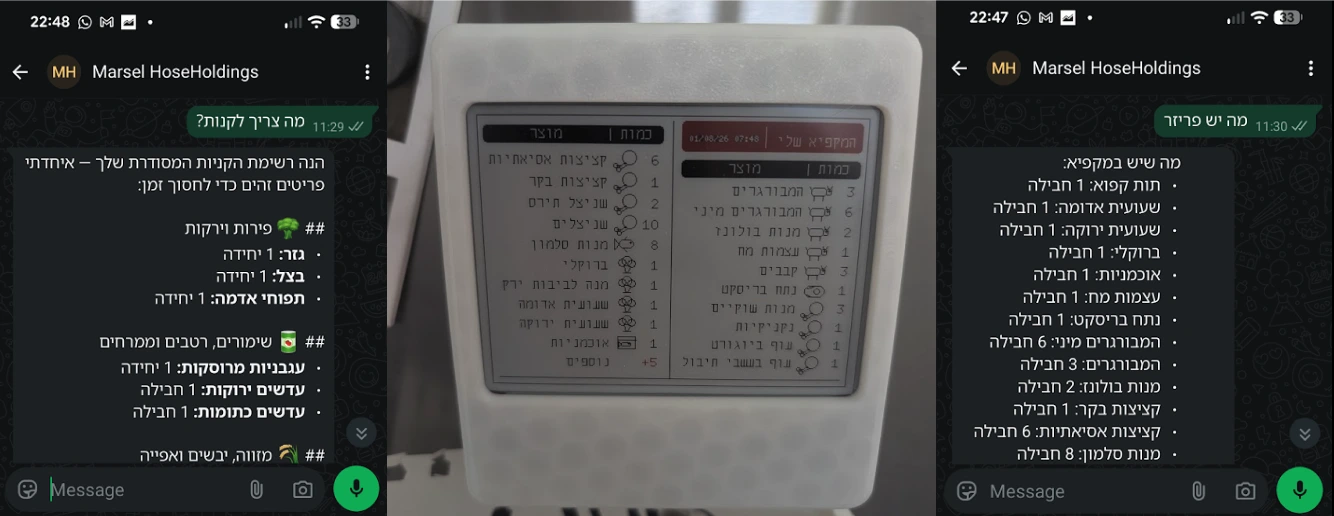
It started with a WhatsApp bot
There is a particular kind of household problem that sounds simple until you try to solve it: knowing what food is actually at home. My wife pointed out that I was not doing the groceries properly. Things were missing, products were used without being tracked, and the shopping list was never telling the complete truth. She was right.
The problem was not the absence of a list. The problem was that every list depended on people remembering to maintain it. I started with Marsel, a private, Hebrew-first WhatsApp assistant for our household.
From WhatsApp, we can:
- Add, remove, correct, or move an item using natural language.
- Send a photograph of a receipt and extract the purchased products.
- Ask what is in the kitchen or freezer.
- Maintain a list of products that should always be at home.
- Add a one-time item to the shopping list without changing the permanent list.
- Undo the most recent receipt import when the result is wrong.
Twilio provides the WhatsApp gateway. A Supabase Edge Function validates and receives each webhook, Gemini turns Hebrew messages or receipt images into structured data, and PostgreSQL stores the household inventory. A second Edge Function exposes only the aggregated freezer data needed by the physical display.
System architecture
The diagram looks simple, but the important design work is in the boundaries between these components.
The difficult parts were not syntax
Make the webhook reliable before making it intelligent
AI and image analysis can take longer than a messaging webhook should remain open. If Twilio waits too long, it can treat the request as failed and retry it. That creates duplicate messages and duplicate inventory updates.
The function therefore verifies the Twilio signature, checks that the phone number is allowed, logs the inbound event, and immediately acknowledges the webhook. The slower Gemini and database work continues as a background task. When it finishes, the bot sends a new outbound message through the Twilio REST API.
Give the model a contract
Natural language is flexible; a database is not. The bot does not ask Gemini for a paragraph and then hope to understand it. It requests structured JSON with a fixed set of intents, locations, and fields. Item names are normalized before storage, quantities are validated, and locations are limited to the kitchen, freezer, or cleaning supplies.
This does not remove the need to understand the code. It changes where that understanding is applied: to the contract, the failure modes, and the checks around generated output.
Treat uncertainty as part of the product
A receipt does not always reveal whether an item belongs in the kitchen, freezer, or cleaning cupboard. Guessing silently would make the inventory less trustworthy. When the location is unclear, Marsel stores a pending question and asks us in WhatsApp. The following reply can be informal—for example, "put the wipes in the kitchen and the rest in the freezer"—and the system resolves what it can while keeping anything still ambiguous open.
Model the household, not just the message
Inventory is stored as line items so one receipt import can be reversed as a batch. When an item is consumed, older stock is removed first. A permanent list defines the minimum quantity of essentials, while a separate missing-items list can also hold one-time purchases. The data model is doing more work than any single prompt because it preserves the household's rules over time.
The first solution exposed the real problem
The WhatsApp bot worked as a system, but it still expected us to remember to talk to it. When several people are eating, cooking, opening packages, and putting things back, reporting every change becomes another household chore. Eventually, the inventory stops matching reality.
That was not only a software failure. It was a product insight: the interaction had too much friction for the frequency of the activity.
The freezer is the real mystery
Our freezer is large, deep, and constantly full of prepared meals for the kids. Because it is difficult to inspect without digging around, we often do not know what is inside until we start moving everything—or, worse, defrost the entire freezer during an apartment move. By then it has become a small archaeological site of forgotten meals.
Tracking a freezer is also fundamentally different from tracking the rest of the kitchen. Freezers operate at a much lower event frequency: items are not constantly taken and replaced every few minutes. More importantly, frozen meals do not need immediate, real-time logging at the exact second they leave the door.
Even if family members take lunch on their own during the day, dinner is when everyone comes together. It is natural to mention what was defrosted or eaten earlier. Updating the freezer can become part of one shared conversation instead of a micro-task repeated throughout the day.
The freezer was therefore a better place to continue the experiment: a smaller data set, fewer changes, and a clear reason to keep the information visible. That became the Freezer Display.
Design
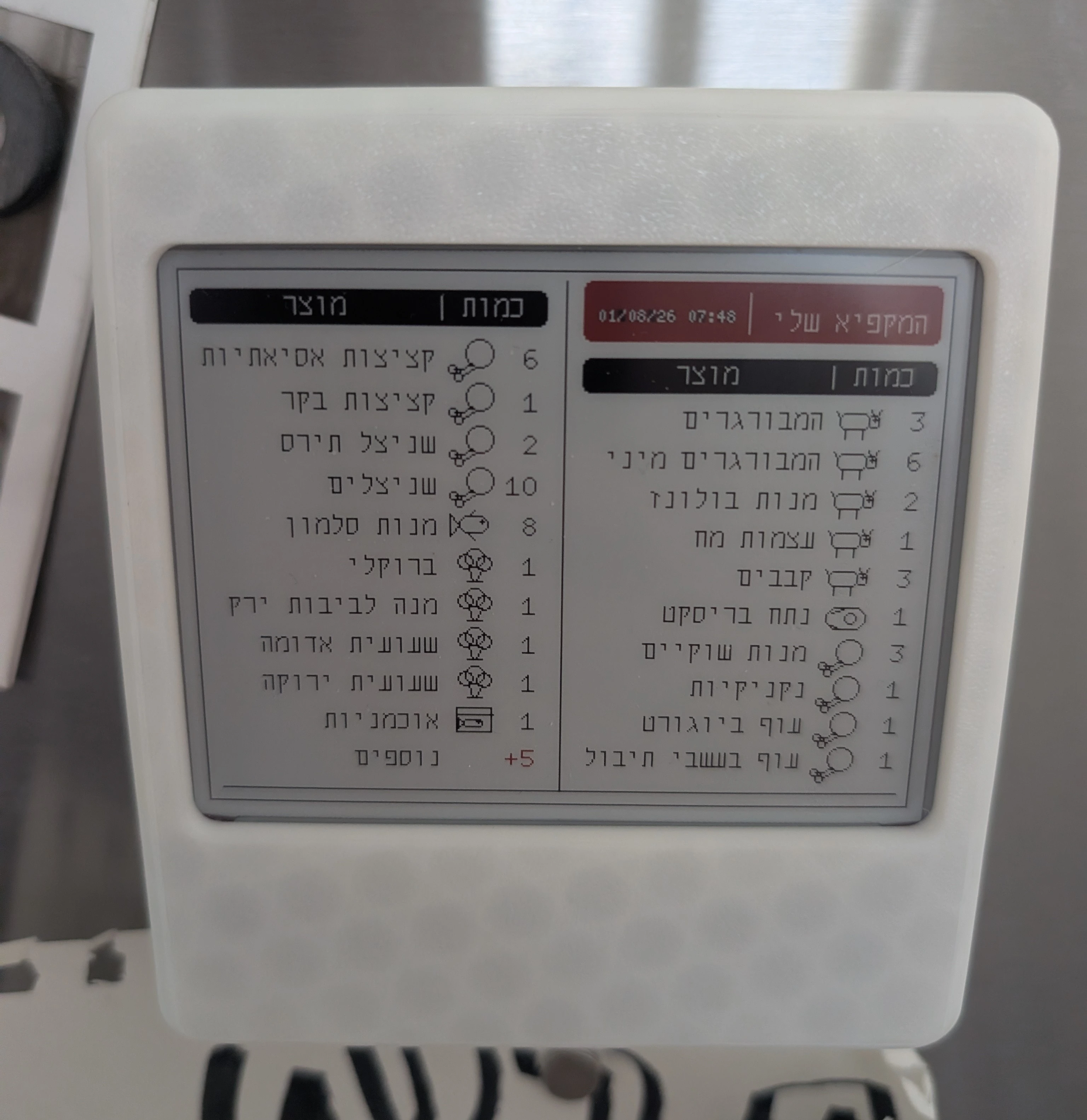
I wanted a physical extension of the inventory system, not another application the family had to remember to open. The display had to live beside the freezer, remain readable at a glance, and show the latest information without cameras or a complicated interface.
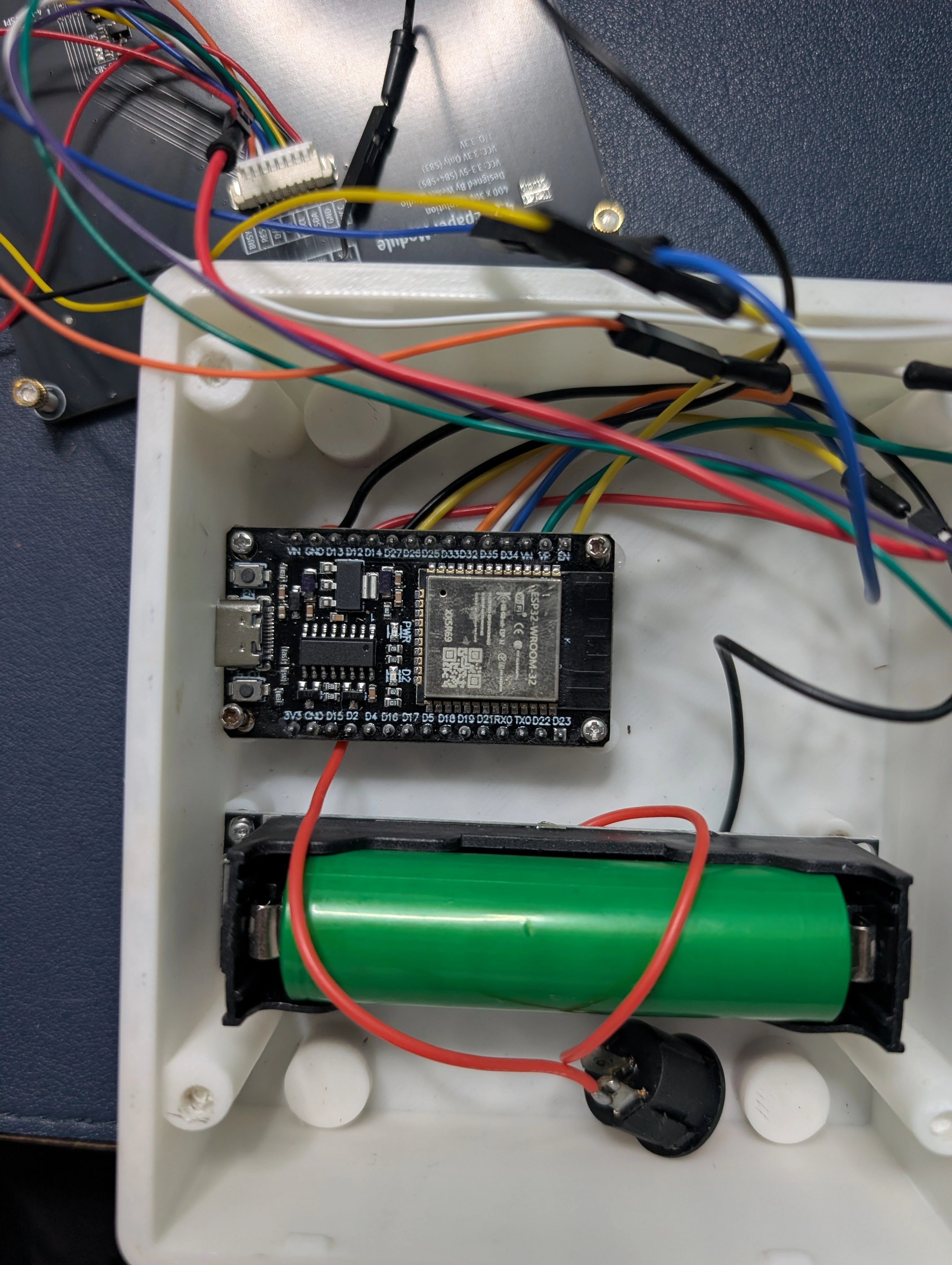
The solution is an ESP32 connected to an e-paper display and powered by a rechargeable lithium battery. The board connects to Wi-Fi, requests the current freezer data, and shows it on the display.
The first version uses a WeAct Studio 4.2-inch black, white, and red e-paper panel with a 400 × 300 resolution. E-paper is a natural fit: it is readable in the kitchen, keeps the last image visible without continuous power, and does not need to behave like a phone or tablet.
The display is intentionally simple. It is a window into information we already have, placed exactly where that information is useful.
Electronic design
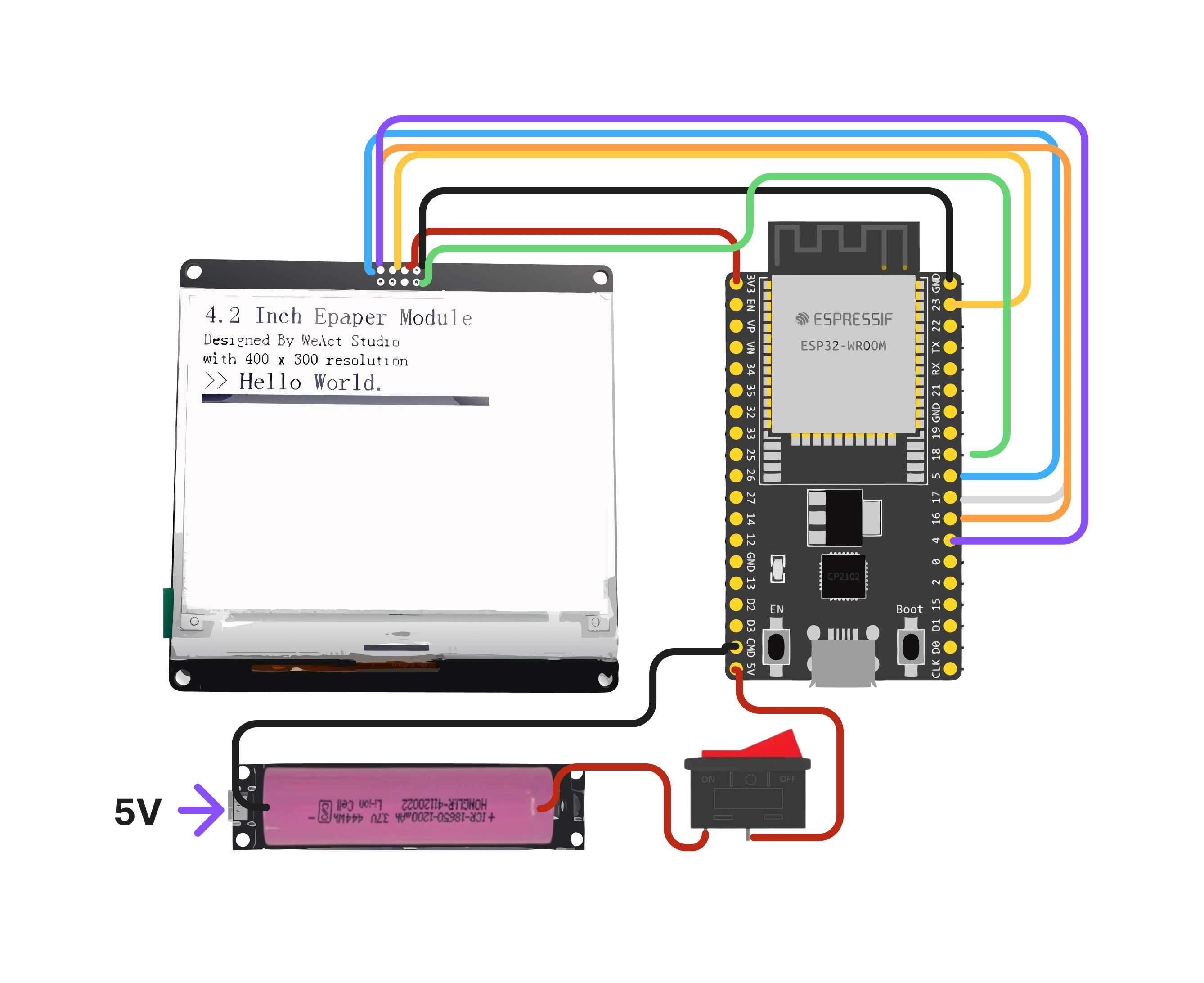
The ESP32 communicates with the e-paper module over SPI. The circuit therefore needs power, data, clock, chip-select, data/command, reset, and busy connections, together with the rechargeable battery supply.
What I evaluate now
With fast code generation, evaluation becomes one of the main engineering tasks. For the software, I test fixed Hebrew commands, receipt images, invalid senders, ambiguous locations, duplicate webhooks, undo behavior, and the database state before and after each operation. A convincing reply is not enough; the stored inventory must also be correct.
For the hardware, I test every module before soldering, then test the assembled system as a whole: Wi-Fi recovery, API failures, update time, Hebrew text, readability, battery behavior, and what remains on the screen when power is removed. The goal is not to prove that a demo works once. It is to understand what I am holding and whether it works as a product.
Build process
1. Model the enclosure
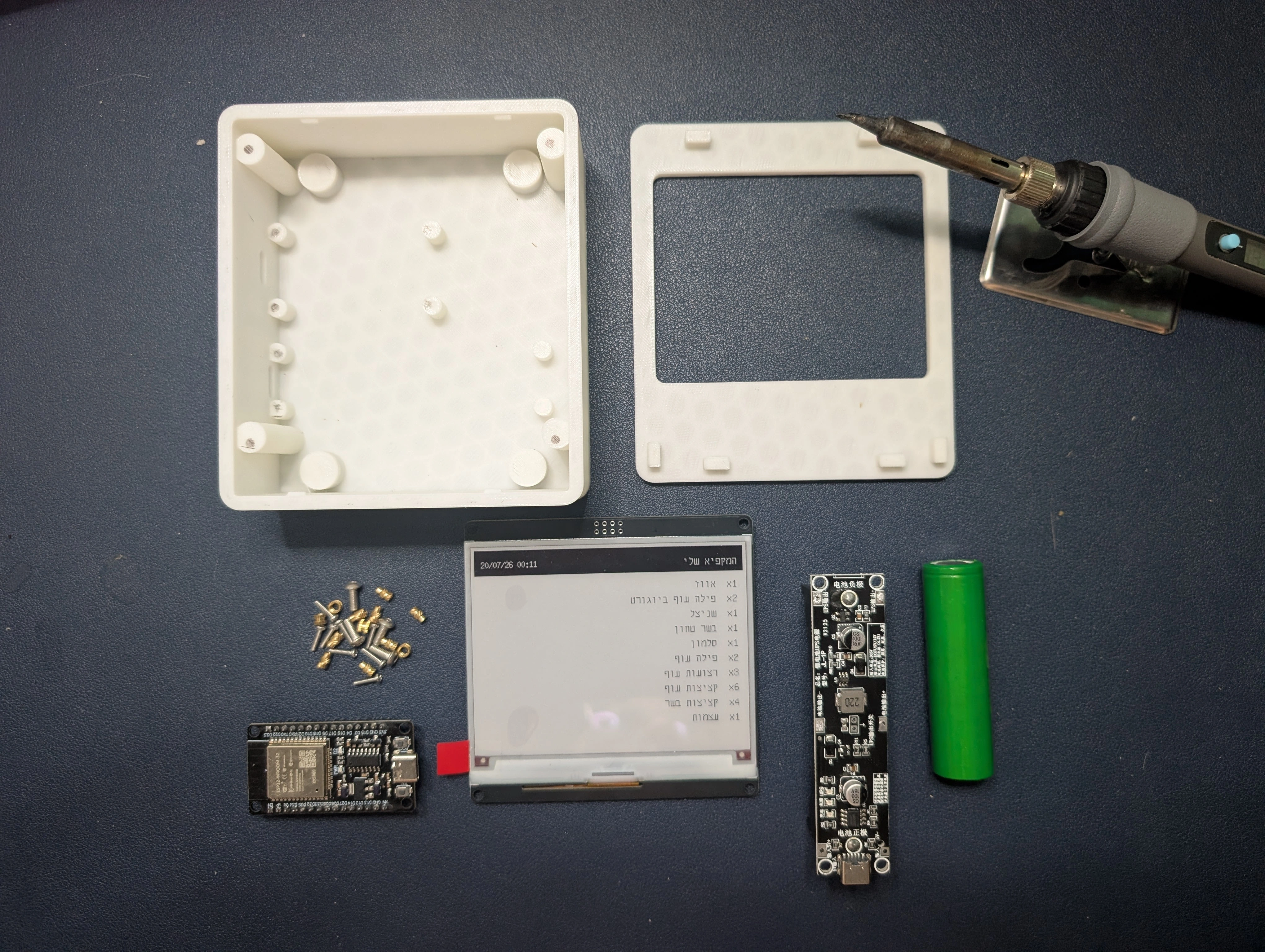
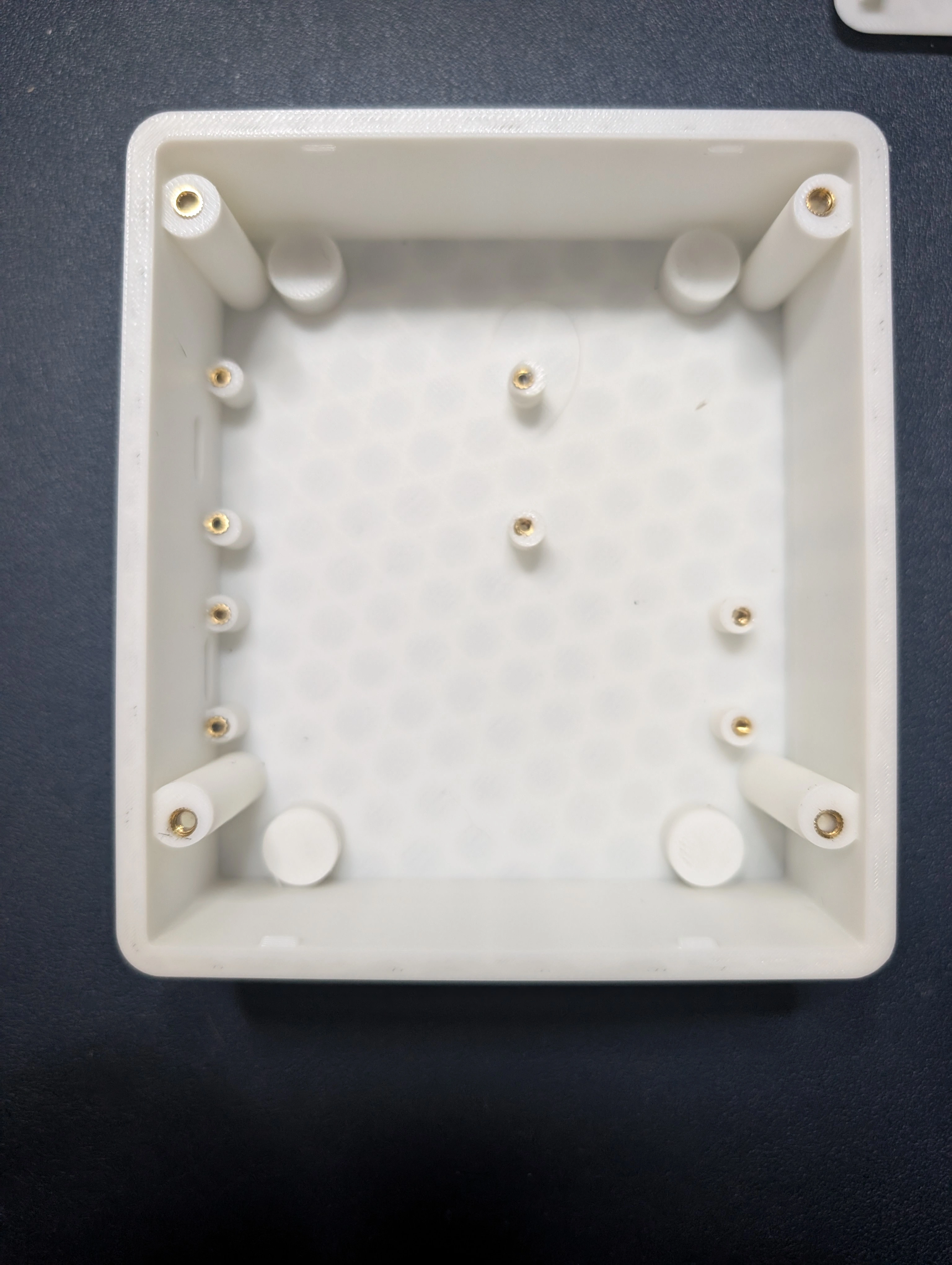
I measured the display, ESP32, battery, and charging module, then designed an enclosure that holds them in a clean layout while preserving access to the critical parts.

2. Test the modules
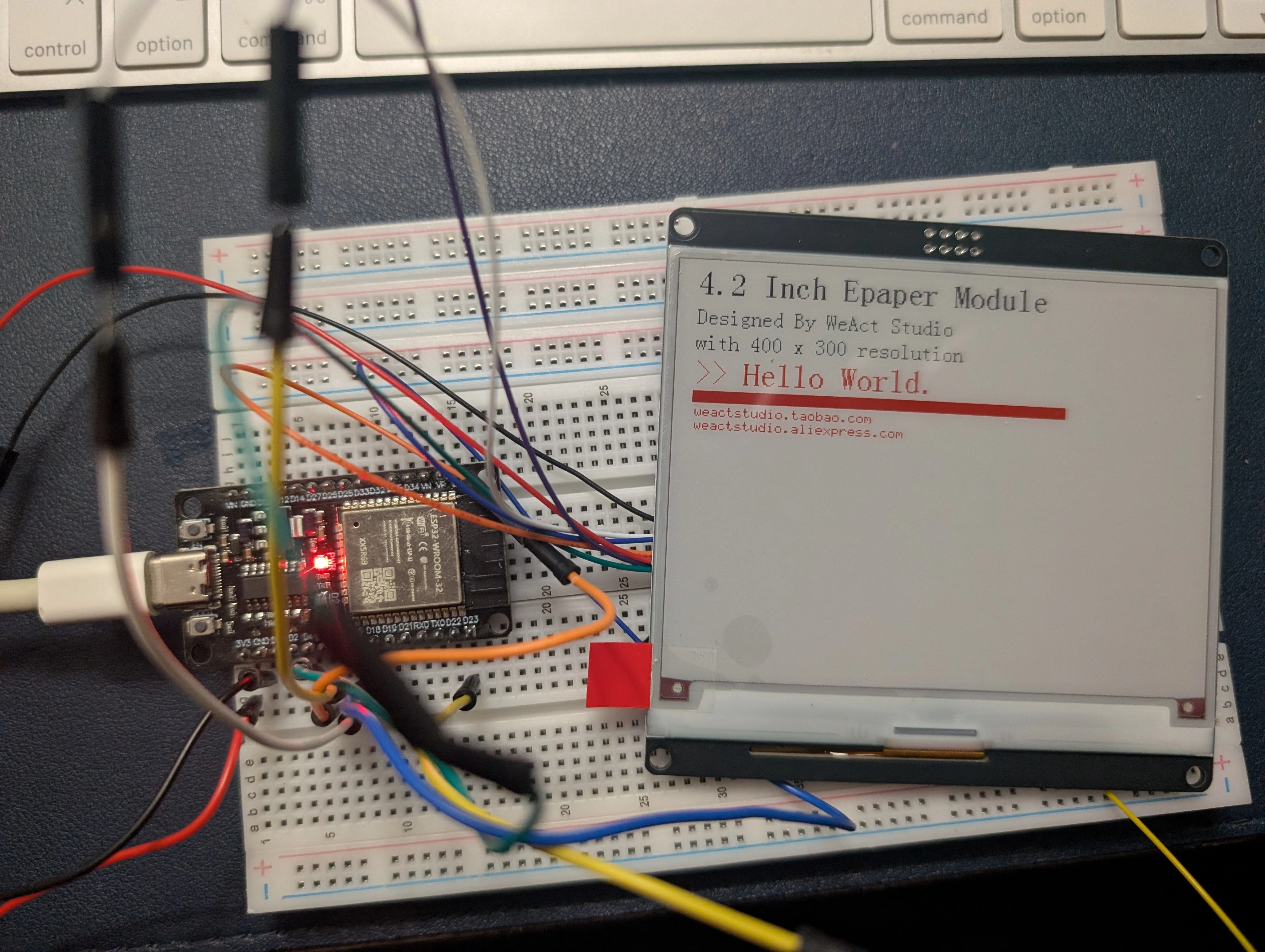
Before soldering, I connected and tested each module independently. This separates component problems from assembly problems and gives every later test a known starting point.
3. Connect real data and solve Hebrew rendering
To test the screen, I first created the refrigerator display Edge Function. It queries only freezer items, aggregates their quantities, and returns compact JSON to the ESP32.
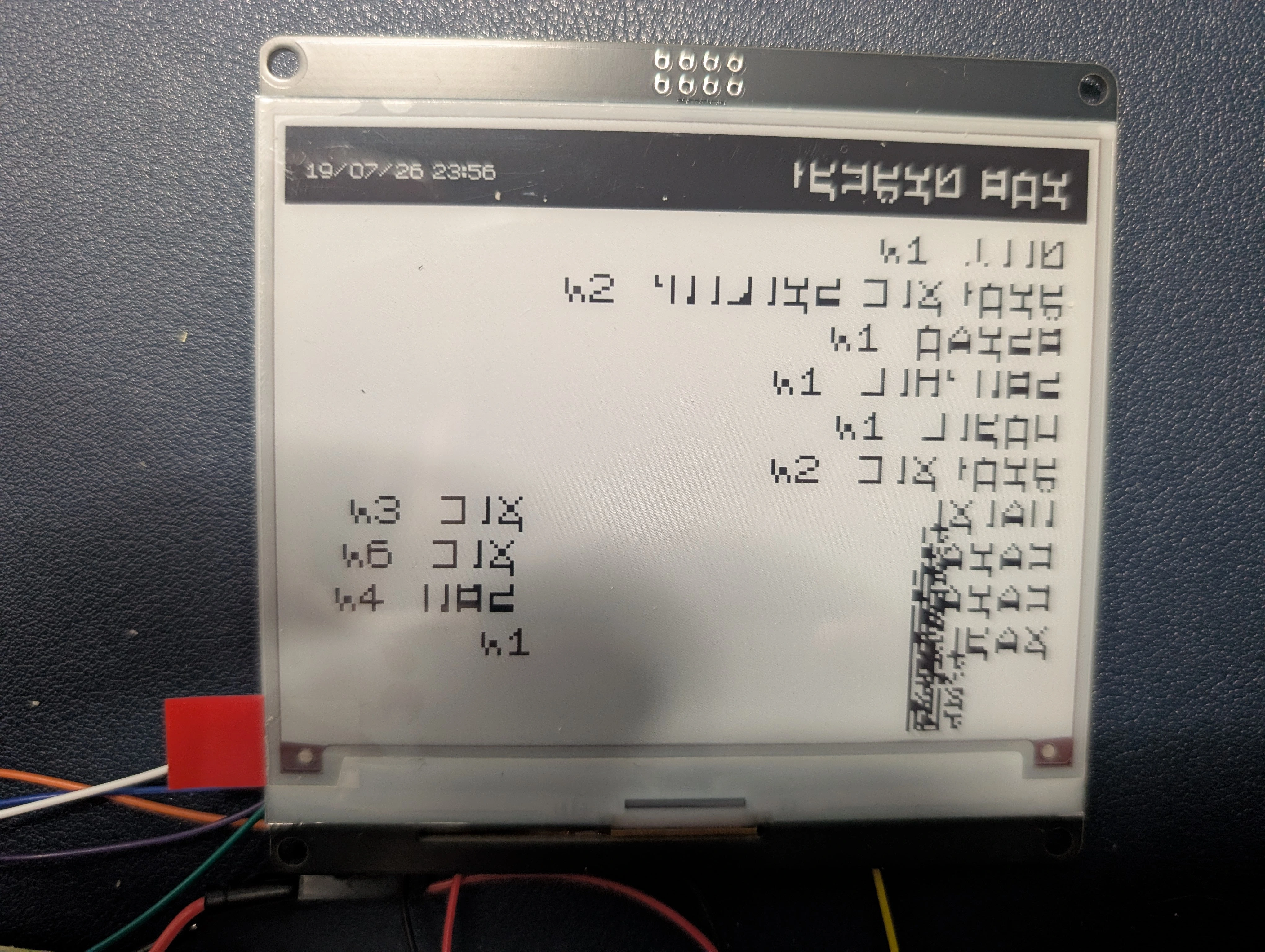
The first real test exposed a Hebrew rendering problem. At first I suspected the display, but controlled tests showed that the issue was the font and the difference between right-to-left Hebrew and the display library's left-to-right rendering. The endpoint now prepares the text for the limited renderer, while the firmware uses a font that contains the required Hebrew glyphs.
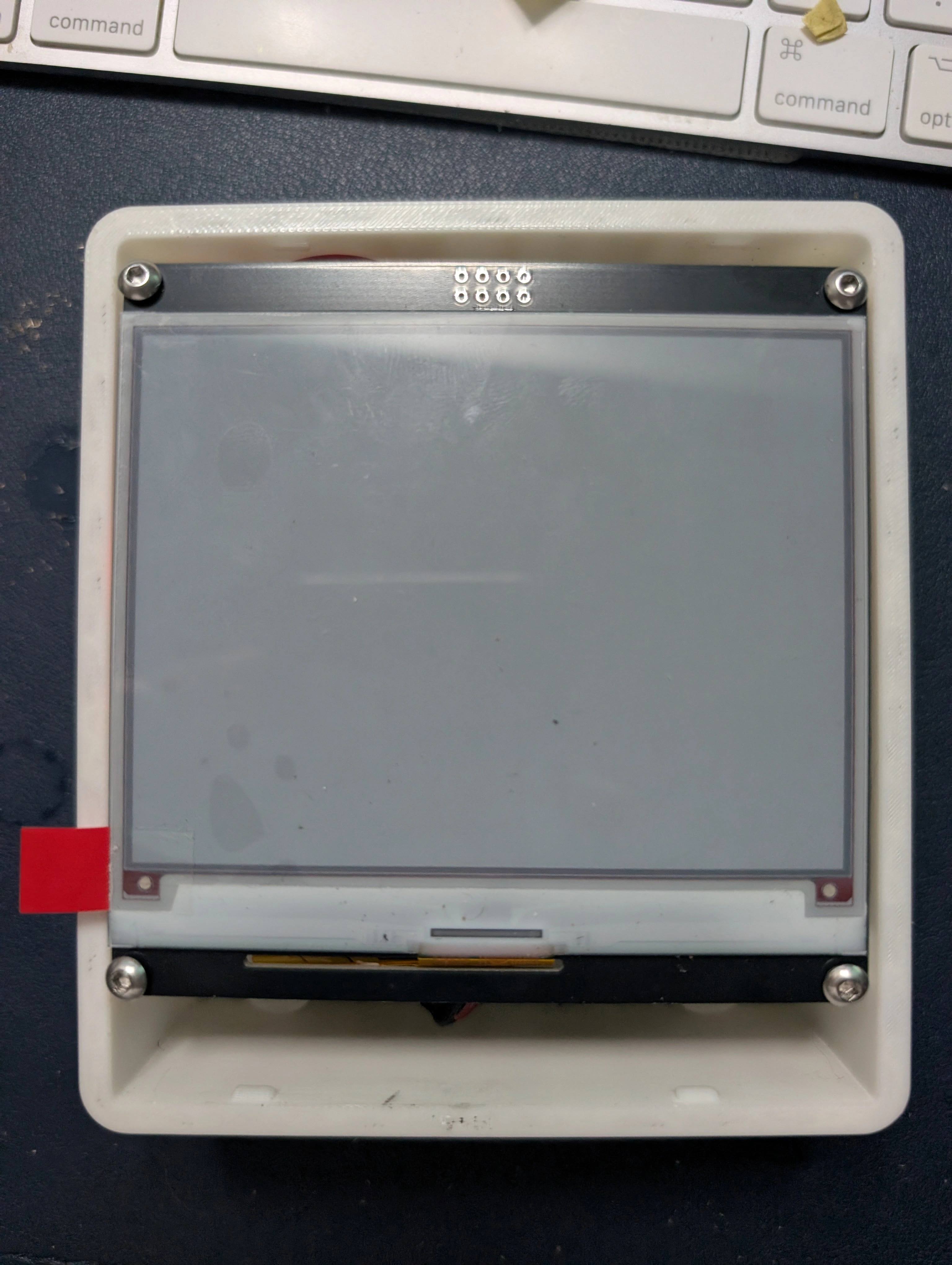
4. Assemble and test the complete device
Update — September 30, 2026: even the phone is too much friction
After months of living with the system, I understand the problem more clearly. People will not consistently take out their phone, open WhatsApp, find the bot, and report what they just used. The display made the inventory visible at the right location, but the input method remained somewhere else. The WhatsApp bot worked technically; it did not create a habit that could keep the inventory accurate.
The next version should make the interaction physical and immediate. A button on or beside the display could let someone move through the visible items and mark the selected item as used. The action would happen at the freezer, in the same moment the item is taken, without requiring another device.
For changes that are harder to express with buttons, the display could have a clear hold to speak control. The user would press and hold it, then say something such as "I took out one lasagna" or "I put three containers of soup in the freezer." Releasing the button would submit the recording, convert the speech into a structured inventory change, and ask for confirmation only when the meaning is uncertain.
This is not yet the finished solution; it is the next hypothesis to test. The lesson from WhatsApp is that a capable interface can still fail when it is not available at the point of action. For a household system, reducing one more step may matter more than adding another intelligent feature.
What this project changed for me
The release of the Sol 5.6 model did not make software knowledge irrelevant. It made the quality of the intention, specification, and evaluation much more visible. I can move from an idea to working software faster, but speed only helps when I can describe the outcome, recognize a weak architecture, test the edge cases, and understand how the software meets the physical world.
The crucial knowledge to preserve is no longer only the final code. It is the problem-solving method that made the result possible: which workflow shortened the path, which decision prevented a class of failures, what evidence exposed the real problem, and how I evaluated whether the change actually worked. If I document only the finished object, I lose the part that can make the next project faster.
In this project, those reusable methods included acknowledging the Twilio webhook before starting slow work, asking Gemini for structured data instead of free-form text, keeping uncertain items in a pending state instead of allowing a guess into the database, and testing every electronic module before soldering the complete system. Each is more valuable as a repeatable decision pattern than as a single piece of implementation.
Visual evidence is part of that method. When the Hebrew display was wrong, a screenshot of the actual output was more useful than a description from memory. A screenshot can be given to a visual AI tool together with the intended result, a reference image, dimensions, and constraints. The tool can then help analyze the difference or generate a clearer target. The new result still has to be compared with the reference and tested on the real display, but the feedback loop becomes much shorter and more precise.
The workflow I want to remember is simple: define the expected outcome, capture the current result, give the tool enough context, make one controlled change, test it in the real environment, and record what was learned. Prompts, screenshots, failed outputs, measurements, and the reason behind a decision are not temporary debris from development; together they form a practical playbook.
That is the lasting lesson of this project. The visible artifact is an e-paper display beside the freezer. The more important artifact is a documented way of working: understand the goal, harness each tool for the part it does best, keep evidence from every useful experiment, and turn successful decisions into methods that can be reused.